
From One Title to 11 Scenes — A Real Story Mode Run
What got made
📌 The screens in this post are UI mockups built from a real project's data and the app's own CSS. The values in them (scenes, segments, prompts) are the actual output. The project itself ran in Korean; the story text shown here is an English translation of that output — the numbers, timings, and prompts are unchanged.
We typed one title — "The Rich Man and the Poor Man" — and ran Story mode. The result was a single episode of 11 scenes, 20 segments, 72.53 seconds, and this post shows the real output from each step along the way.
That's everything that went into the Setup tab:
| Field | Value |
|---|---|
| Title | The Rich Man and the Poor Man |
| Story type | Bespoke |
| Generation AI | Claude Opus 4.8 · reasoning medium |
| Output language | Korean |
| Script length | 1 minute |
| Scene split unit | Scene-based · 5–10 sec |
| Review loop | Off |
The script field was left empty. So we started with no topic, no plot, no cast.
2 Synopsis — logline and hook come first
Before any prose gets written, the skeleton of the story is settled. Here's the logline that came out:
Logline — A poor old man who received an envelope every month from a rich man's estate learns, only after the rich man dies, that the true sender was himself.
Hook — For thirty years, on the first of every month, an unmarked envelope was left at the old man's door. But on the day the rich man died, what came out of it was not money — it was a single faded promissory note.
A paragraph each for setup, rise, turn, and resolution follows. The twist — the rich man had been repaying a debt — lands in the turn, and the resolution has the old man taking over that role. That structure exists before a single line of script is written.
The cast — gender, age, role, and appearance, all fixed
The synopsis step also finalized four characters. These values are reused downstream for voice casting and image prompts.
| Character | Gender | Age | Role |
|---|---|---|---|
| Park | M | 70s | Poor old porter, the protagonist |
| Chairman Yun | M | 70s | The rich man on the hill, repaying an old debt |
| Gatekeeper | M | 40s | Mansion gatekeeper who turns Park away |
| Lawyer | M | 50s | The lawyer who delivers Chairman Yun's last wish |
Each character also carries an appearance description. Park's is Korean man in his 70s, deeply weathered face, sparse white hair, thin frame, worn padded jacket and cloth cap, quiet dignified sorrow. That description is what the image prompts are built from. It isn't copied verbatim — each scene reshapes it — but its key traits recur every time. Add a generated reference image on top and it gets attached to each scene, which is what makes him the same person throughout.
3 Script — dialogue arrives with speakers attached
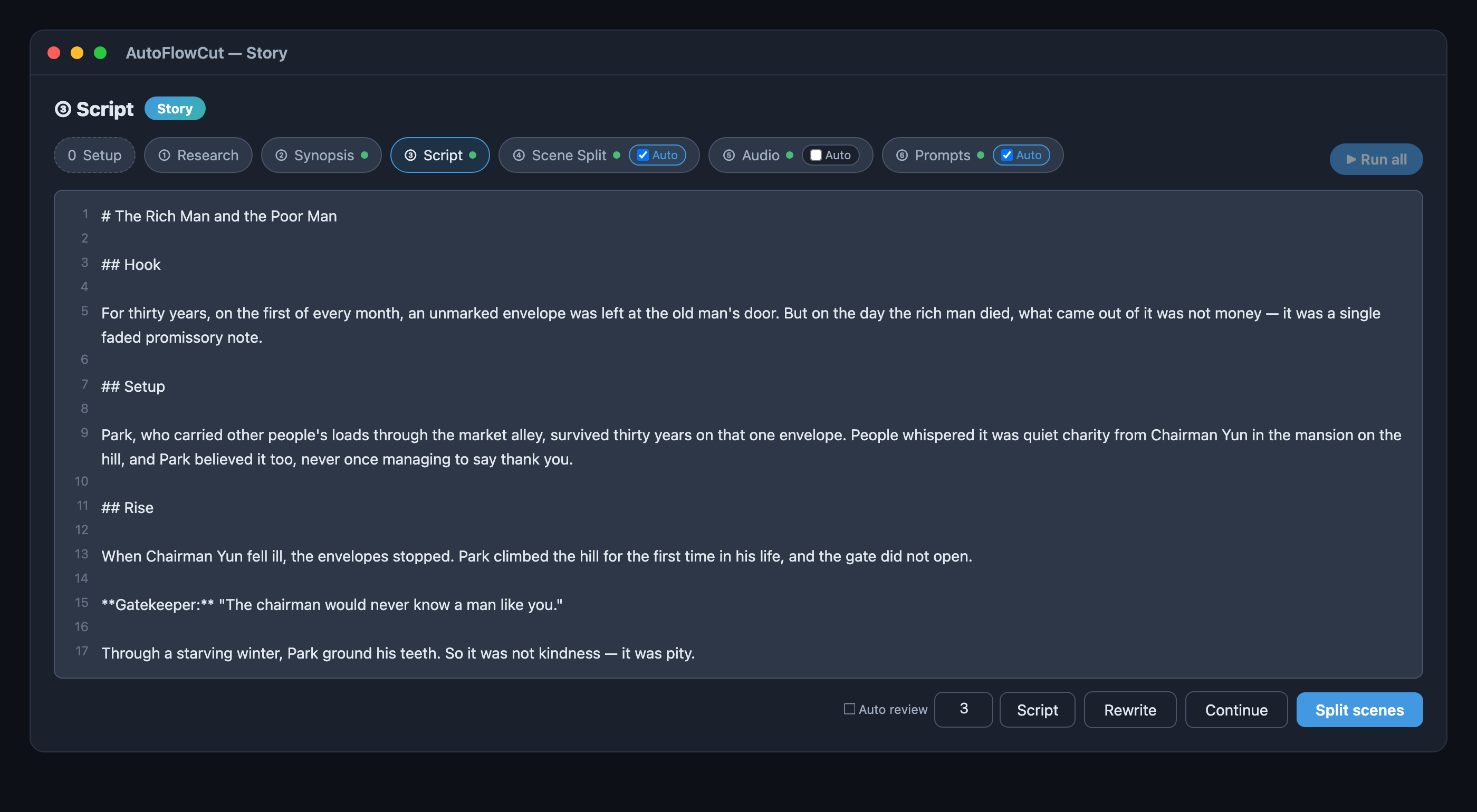
The prose came out in hook → setup → rise → turn → resolution order, with speakers prefixed on the dialogue:
Gatekeeper: "The chairman would never know a man like you."
Chairman Yun: "You gave when you had nothing. I could only repay after I had everything."
Those two lines become separate speaker segments, split out from the narration, in the next step.
4 Scene split — 11 scenes, 20 segments
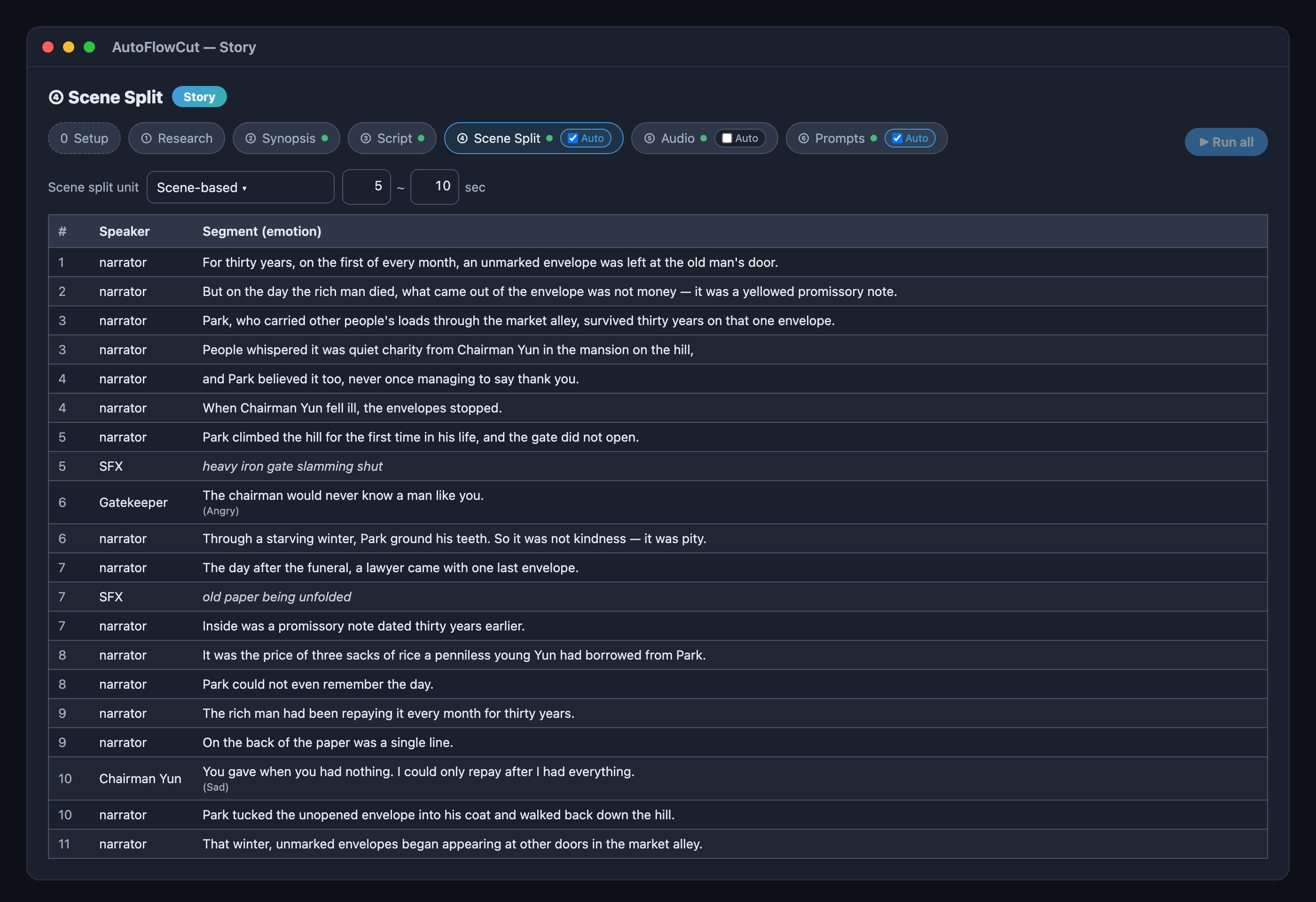
The script became a table. Here's the distribution that actually came out:
- Speakers — 16 narrator, 1 Gatekeeper, 1 Chairman Yun, 2 SFX
- Emotions (in the scene data) — 8 sad, 7 normal, 2 angry, 1 happy. The table only shows the two dialogue lines' emotions; narration emotion isn't displayed
- Length — 72.53 seconds total. Under the scene-based 5–10 second setting, individual scenes landed between 4.4 and 9.2 seconds
The two sound effects were placed at the story's decisive moments on their own: heavy iron gate slamming shut (scene 5) and old paper being unfolded (scene 7). Nobody asked for that — they landed on the peak of the tension and the turn.
Script done to scene split done took 37 seconds.
5 Audio — all 20 segments generated
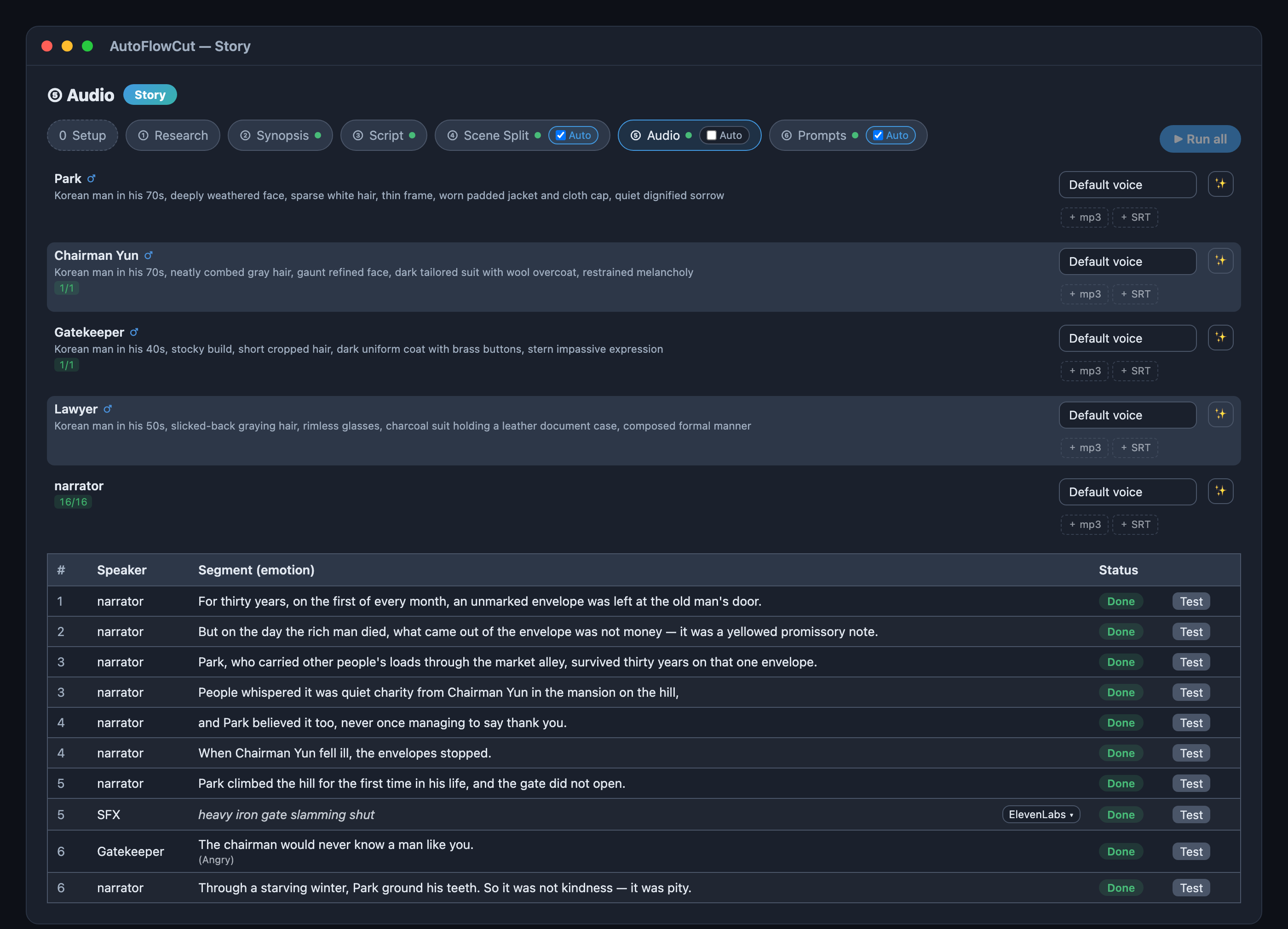
- 18 narration and dialogue segments — generated with Typecast. Emotion is only applied to character dialogue: narration is always synthesized as
normaleven where the table shows sad or angry. So exactly two lines in this episode carry emotion — the Gatekeeper's(Angry)and Chairman Yun's(Sad). - 2 sound effects — generated with ElevenLabs.
- Output — 20 segment audio files plus one time-aligned SRT. Every segment holds a start time and duration in milliseconds, so it drops straight onto the scenes.
Scene split done to audio done took 14 minutes 23 seconds — the longest stretch of the pipeline.
6 Prompts — an image and video pair per scene
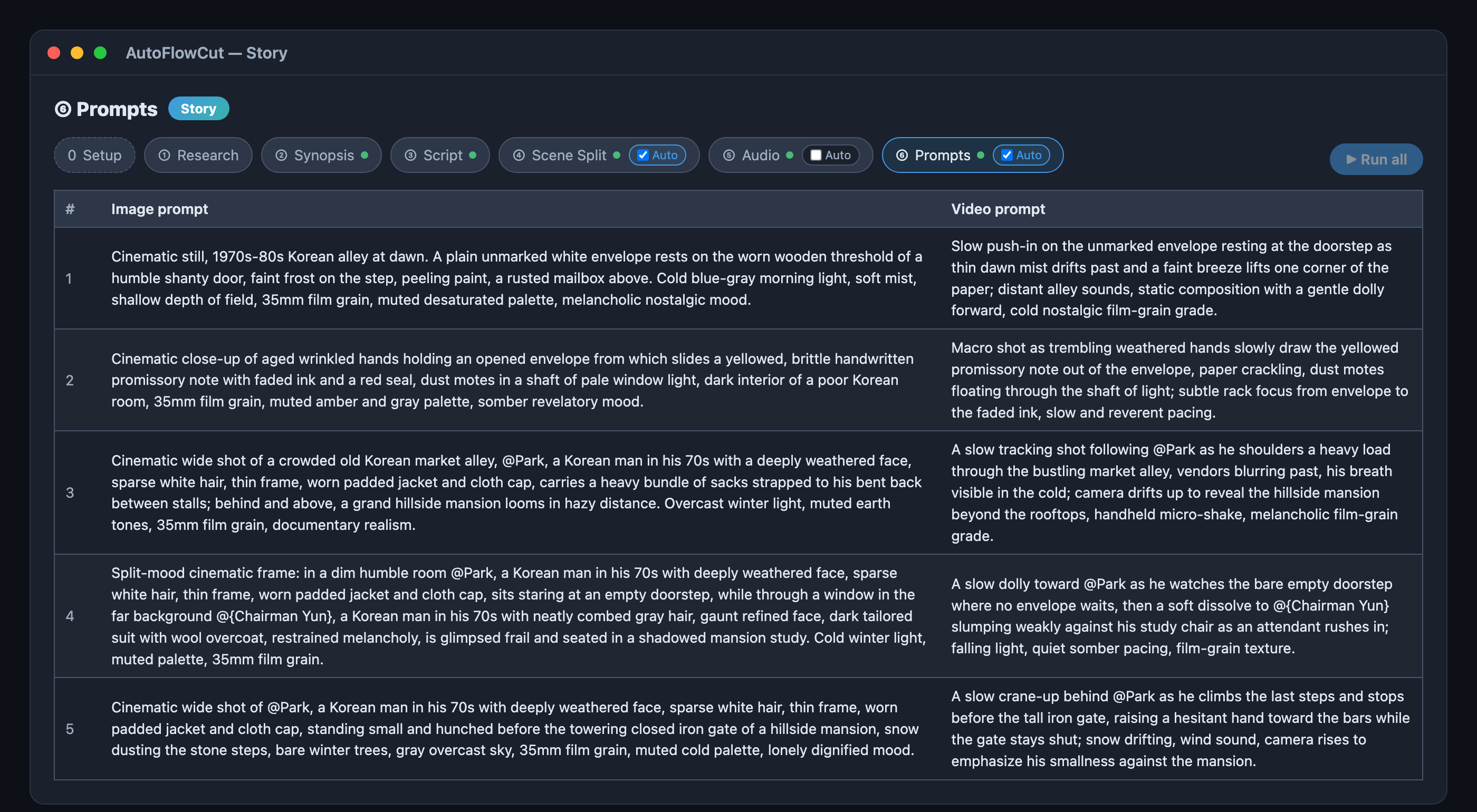
11 scenes produced 11 image and 11 video prompts — 22 in total. Scene 1's, verbatim:
Image — Cinematic still, 1970s-80s Korean alley at dawn. A plain unmarked white envelope rests on the worn wooden threshold of a humble shanty door, faint frost on the step, peeling paint, a rusted mailbox above. Cold blue-gray morning light, soft mist, shallow depth of field, 35mm film grain, muted desaturated palette, melancholic nostalgic mood.
Video — Slow push-in on the unmarked envelope resting at the doorstep as thin dawn mist drifts past and a faint breeze lifts one corner of the paper; distant alley sounds, static composition with a gentle dolly forward, cold nostalgic film-grain grade.
Scenes featuring a character got mentions like @Park and @{Chairman Yun} inserted automatically. Names with a space are wrapped in braces. The four characters are registered as reference cards when the cast is confirmed. Once a card's image exists, it is attached to every scene that mentions that character — which is what keeps the same face across all 11 scenes.
Audio done to prompts done took 53 seconds. From script to prompts, the whole thing took 15 minutes 53 seconds.
The Ref tab — the four characters get a face
With prompts in hand the next thing is pictures. But not scene pictures yet — fix the faces first, or the same character comes out different in every scene.
The four characters confirmed at Synopsis are already registered as reference cards in the Ref tab. Each card's prompt is assembled from that character's ethnicity, age, gender, and appearance fields — the cast table you saw earlier is literally the blueprint for the picture. Generate All opens a batch dialog; confirm it and all four are generated together. Once they're all done the button disappears — that's the state in the screen below.
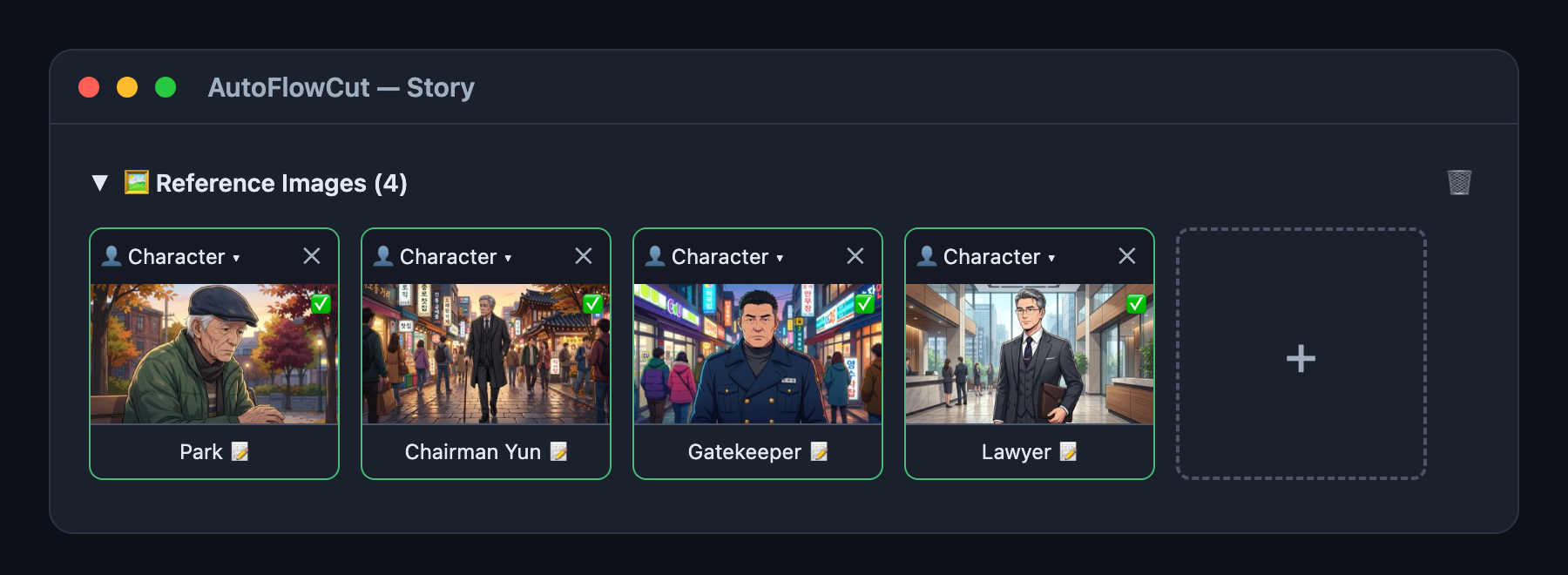
A green border and a ✅ badge mean that character is ready to be used in scene generation. Don't like one? Regenerate just that card — no scenes exist yet, so there's nothing to undo.
Scene images — 11 scenes become pictures
With the cast fixed, generate the scenes in a batch. Look at the Match Tags column: each row carries the characters appearing in that scene — Park, Chairman Yun, Park — and the border turns green when a tag matches a reference. That match is what attaches the character's reference image to the generation.
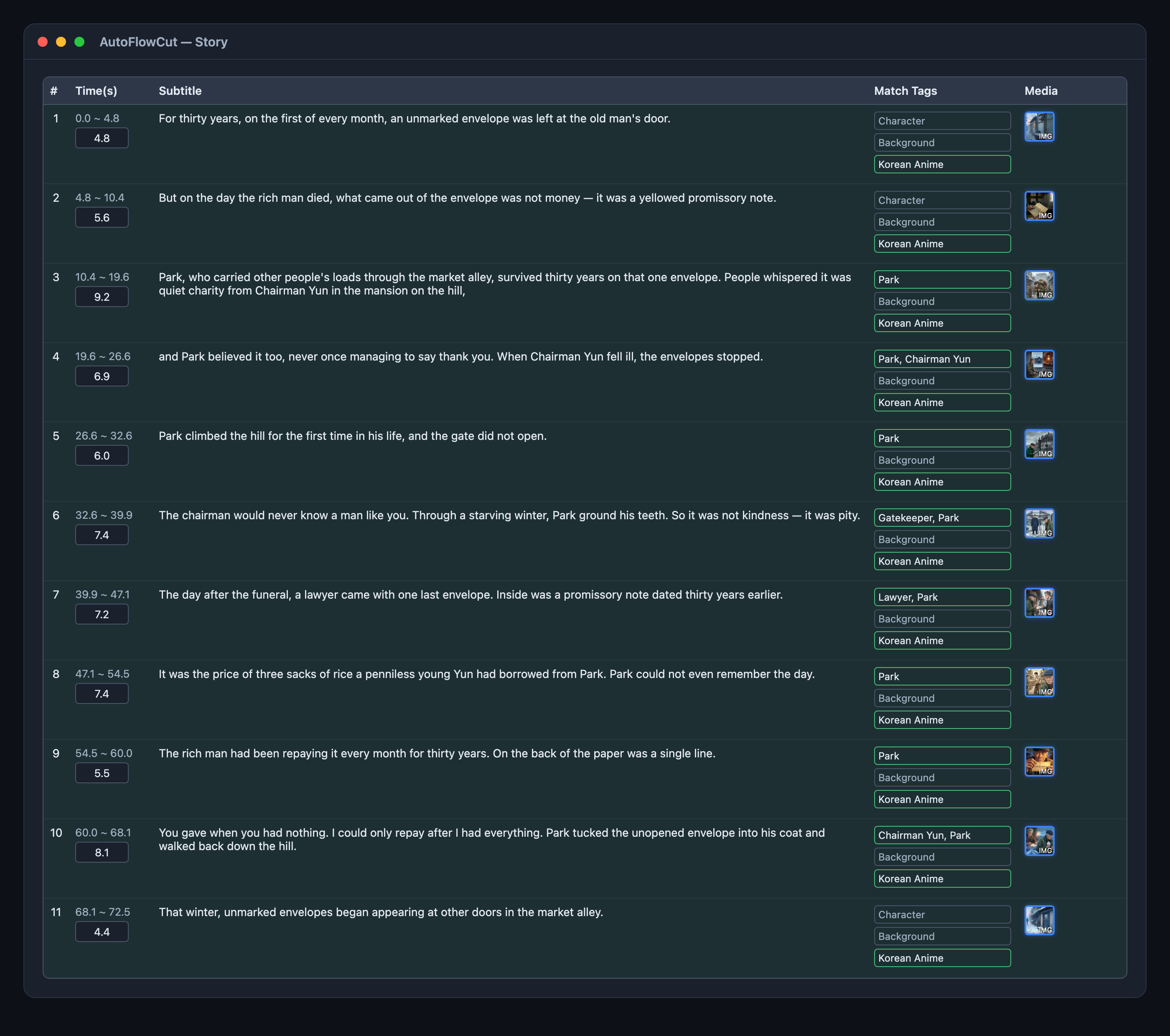
Scenes 1, 2, and the closing scene 11 have empty tags: they center on objects — the envelope, the promissory note — so there's no named character to attach a reference to (scene 2 shows a pair of hands, but not as a specific character). Characters enter as cast from scene 3, and the tags fill in from there.
Checking the results — as a table, or as cards
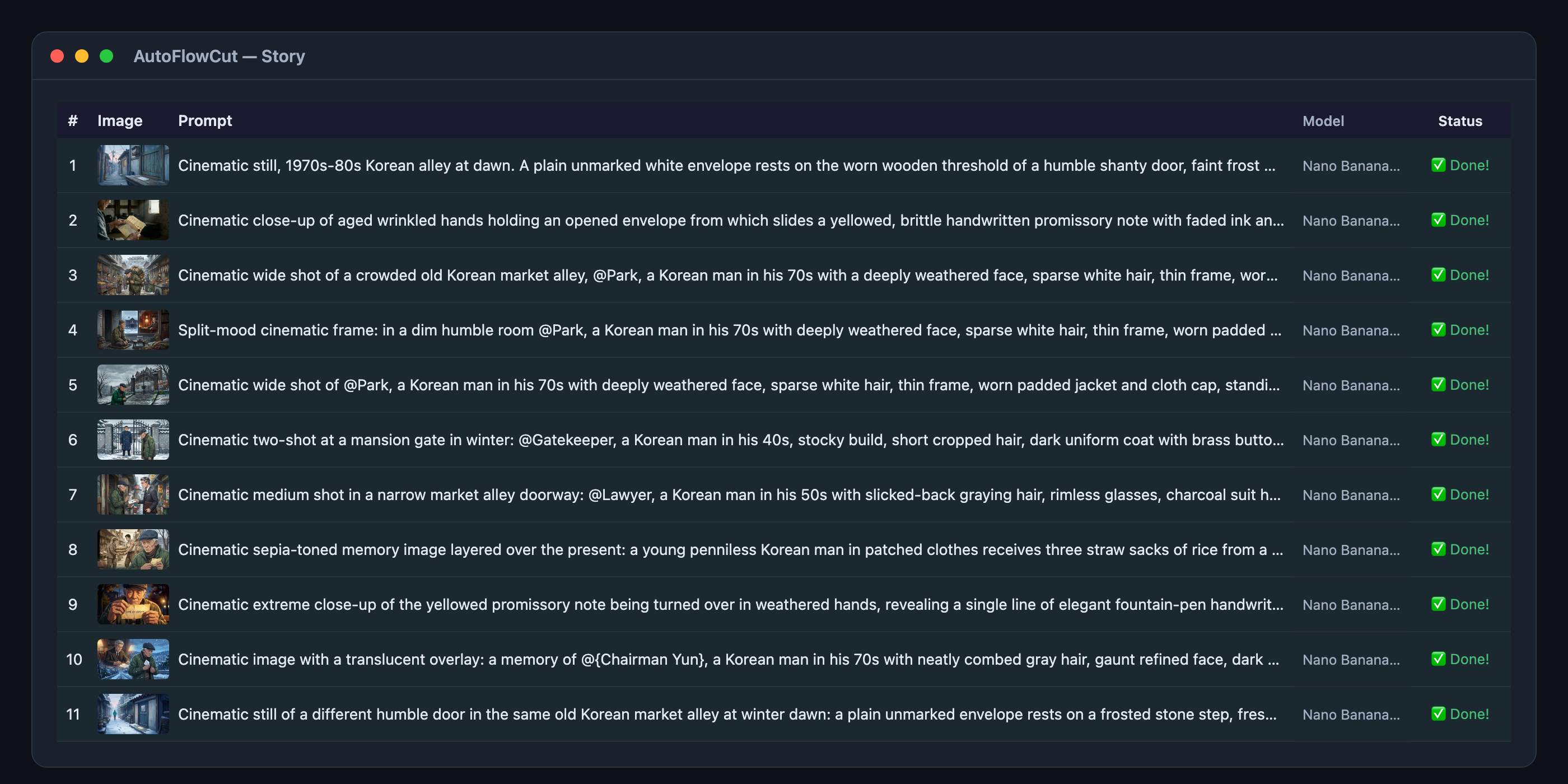
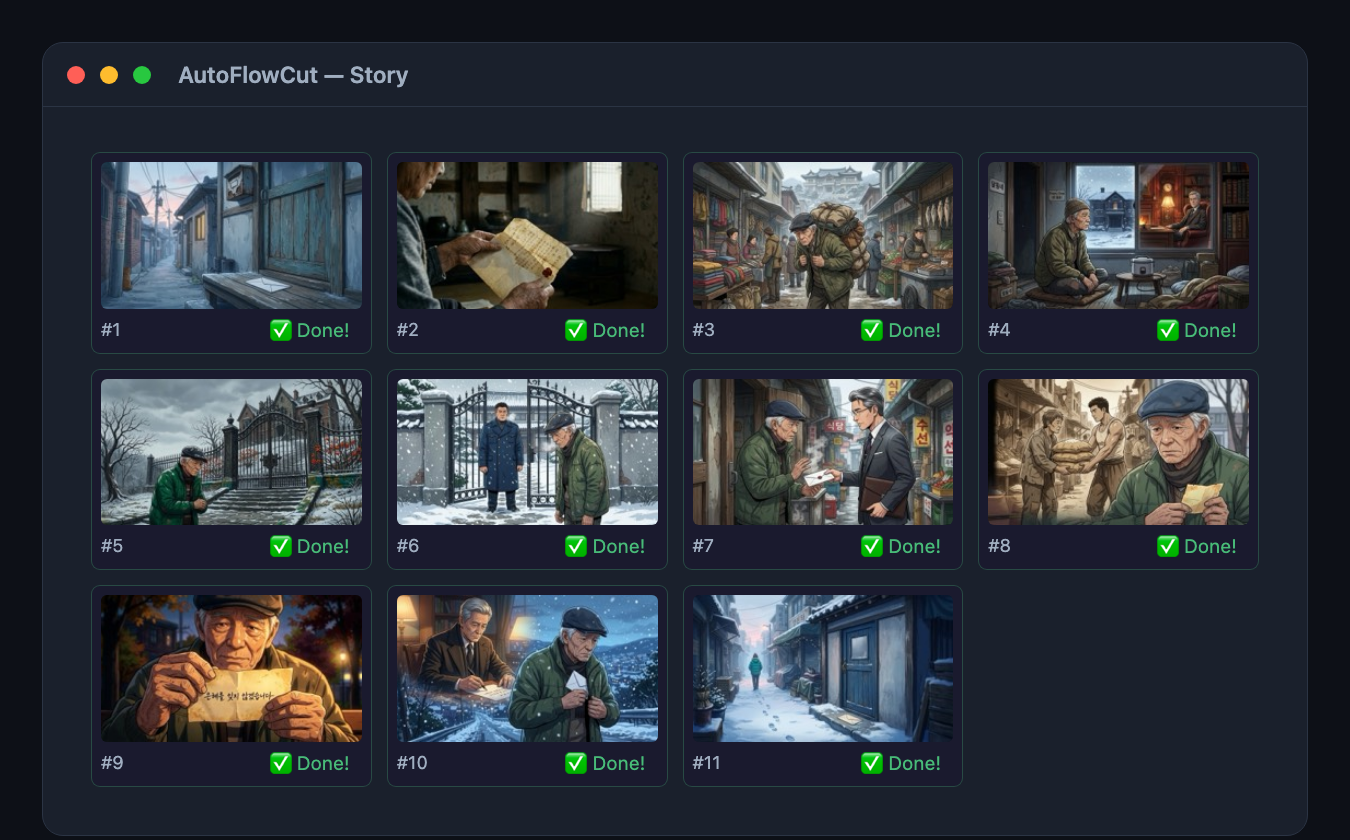
The bottom panel shows the same generations two ways: the ☰ Results tab and the ⊞ Grid tab.
The results table lays out, per scene, which prompt, which model, what status — one row each. It's the view for checking what actually went into the generation; the @Park and @{Chairman Yun} mentions are visible verbatim.
The grid shows the same results as image-first cards. A card keeps only its number and status — both the prompt and the model are gone. That's what makes it the view for skimming all 11 at once and spotting the shot whose tone drifts.
Timeline preview — putting it together
Once the images exist you can play the whole thing in the timeline at the bottom. This is where you check that picture, subtitle, and sound actually line up before exporting.
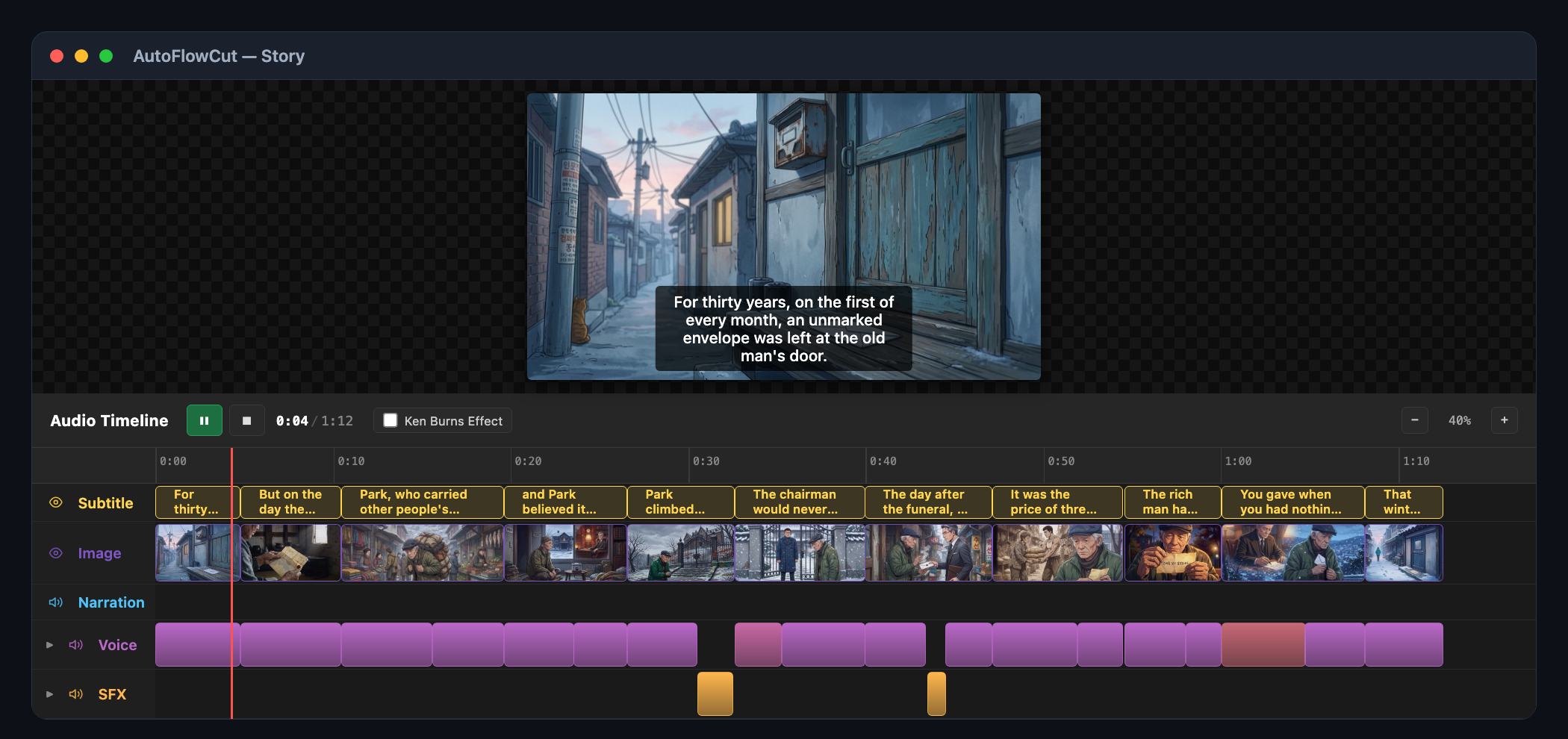
The five lanes lay the episode's structure bare:
- Subtitle — the lines sit over the same spans as the scenes.
- Image — 11 scenes, each taking up its own duration. You can see the width gap between the shortest scene (4.4s) and the longest (9.2s).
- Narration — empty. That lane is reserved for audio pulled from an imported video, so nothing Story mode synthesized lands there.
- Voice — this is where the 18 segments go, tinted per speaker, so narrator, Gatekeeper, and Chairman Yun are distinguishable at a glance. The gaps are where the sound effects sit.
- SFX — only two, but placed exactly: the gate slamming at 30.5s, the note unfolding at 43.4s.
From here it's your call
That is as far as Story mode carries itself. It isn't fully unattended, though — you have to confirm the cast at step 2 before the downstream steps unlock, and Audio's auto toggle is off by default (TTS costs money), so you either switch it on or run that step yourself. What's left is taste:
- Fix the prompt on the scenes you don't like and regenerate just those.
- Generate T2V/I2V video only for scenes that need motion.
- Export to CapCut, Adobe Premiere, or Vrew in one click — the audio tracks and SRT are already aligned to the scenes, so the timeline opens finished in your editor.
In short
One title produced synopsis → 4 characters → script → 11 scenes → 20 audio segments → 22 prompts → 4 reference images → 11 scene images. The human work was picking a handful of settings, confirming the cast, and pressing generate.
To try the same flow, see how to start from a single title. Already have a script? See pasting a script. Want to pick the topic with data first? See YouTube benchmarking.